Every Goodiebag sender faces the same question before creating their first packet: should I let anyone claim, or should I restrict who can participate? The answer depends on who you are sending to, how well you know them, and what kind of experience you want to create. Digital payments are now a normal part of everyday life in Nigeria, which makes link-based claim flows easier for many users to understand. Understanding the difference between a public drop and a guest list drop is your first step toward picking the right mode for every cash gift you create.
Key Takeaways
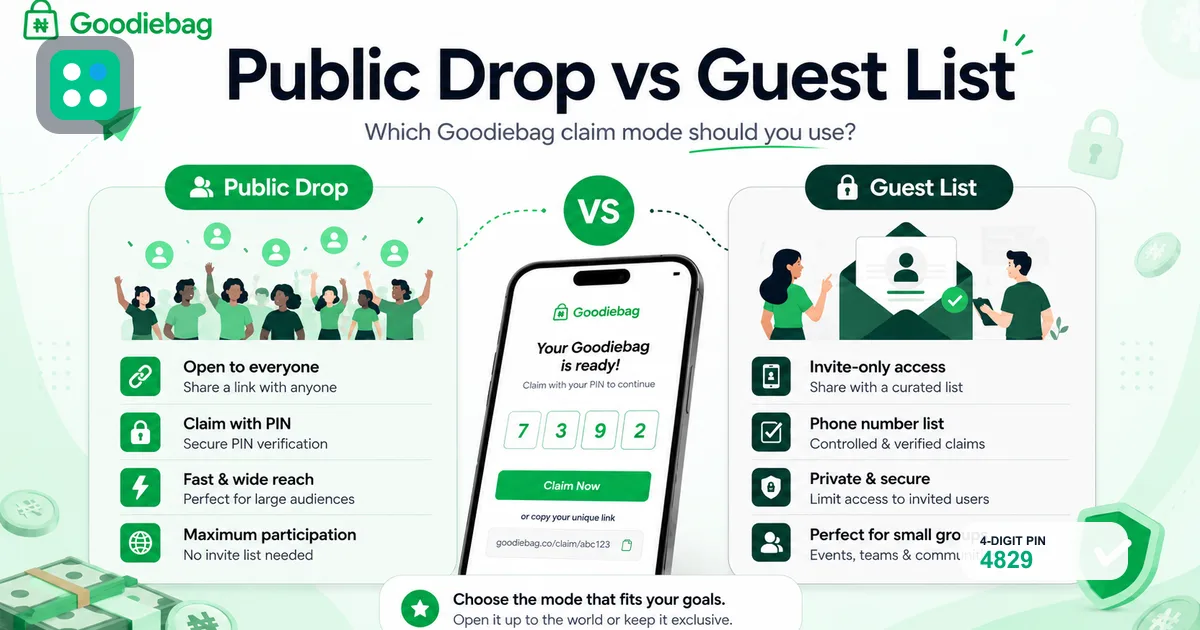
- Public Drop lets anyone with the link and PIN claim, making it ideal for social media giveaways, creator drops, and open community rewards.
- Guest List restricts claims to specific phone numbers so only the people you name can receive the money, even if someone else has the PIN.
- The claim link and PIN must always be shared in separate messages to stop unauthorised claims before the right person gets in.
- Nigerian fintech users on OPay, PalmPay, and Moniepoint can claim directly with their phone number, no app download needed.
What is Public Drop on Goodiebag?
Public Drop is the default claim mode on Goodiebag. When you create a bag in Public Drop mode, anyone who has the share link and the four-digit claim PIN can open the link, enter the PIN, and claim a share of the money. Goodiebag processes the claim through Paystack, and successful claims are processed through Paystack and supported payment partners to the recipient's supported phone-linked fintech account. There is no restriction on who can enter the PIN. The first eligible people to claim get the shares, and once all slots are filled, the bag is closed for everyone else.
The mechanic is straightforward. You share the link in a WhatsApp group, Telegram channel, or social media post. You release the PIN at the moment you want claims to begin. People open the link, type in the PIN along with their phone number, and the money is sent through Paystack. No account creation. No app download. No bank account numbers to type. Just a phone number linked to a fintech bank and the PIN you provided. The speed of this flow makes Public Drop the preferred choice for time-sensitive giveaways where you want maximum participation with minimum friction.
When Should You Use Public Drop?
Public Drop is your best option when you want maximum participation and the lowest possible barrier for recipients. It works well for content creator giveaways, social media engagement drops, brand promotions where you want to reach new audiences, and any situation where you do not have every participants phone number in advance. Nigeria's mobile-first environment makes phone-friendly claim links practical for many users without collecting details upfront.
If you are a creator on Instagram, TikTok, or Twitter trying to grow engagement, Public Drop removes every barrier. A follower sees your post, taps the link, enters the PIN you display in your story, and can claim without signing up. You do not need their phone number in advance. Public drops can work well for time-sensitive campaigns because the claim while slots remain format gives people a clear reason to act quickly. Actual participation depends on audience size, trust, timing, and how clearly you share the claim instructions.
- Social media giveaways where followers can participate in a social cash drop
- Community drops in large Telegram or WhatsApp channels
- Brand engagement campaigns where you want broad reach and visibility
- Birthday or celebration drops shared publicly with friends and well wishers
- Event drops where attendees claim during a live moment such as a wedding reception
For more ideas on running successful giveaways with Public Drop, see our giveaways guide.
What is Guest List on Goodiebag?
Guest List is the restricted claim mode on Goodiebag. When you add a guest list during bag creation, you enter the specific phone numbers that are allowed to claim. Only those phone numbers can receive the money, even if someone else gets hold of the link and PIN. If a phone number not on the list tries to claim, Goodiebag rejects the request immediately. This mode gives you complete control over who can access the funds. Online financial fraud is a real concern, so senders should use clear instructions, protect the claim PIN, and choose the right claim mode for the situation.
Guest List does not change the claim experience for the recipient. They still open a link, enter the PIN, and confirm their phone number. The difference happens behind the scenes. Goodiebag checks the phone number against the list you uploaded during creation. If it matches, the claim proceeds. If it does not, the recipient sees an error message telling them they are not authorised. This eliminates the risk of strangers claiming money meant for specific people, which is the main downside of a fully public drop. Most sender-facing giveaway platforms force you to choose between open access and restricted access. Goodiebag gives you both options plus the hybrid link-and-PIN approach, which means you can layer access controls instead of picking one rigid mode.
When Does Guest List Make More Sense?
Guest List is the right choice whenever you know exactly who should receive the money and you want to eliminate the possibility of unauthorised claims. It is the safer mode for every situation where the recipients are known in advance. Nigeria's growing digital payment ecosystem makes controlled distribution channels valuable for sensitive transfers where every recipient must be verified.
For family drops like Sallah money for your nieces and nephews, Guest List means only their phone numbers work. For staff bonuses, only your team members can claim. For church or community giving, only registered members receive. The guest list feature works well for formal occasions where you have already collected RSVPs or phone numbers. You paste the full list during bag creation and share the link with confidence that only the right people will claim. Learn how to set up your first guest list drop in our groups guide.
- Family cash gifts for Eid, Christmas, or birthday celebrations where you know everyone's number
- Staff bonuses and team appreciation drops where only current employees should claim
- Church and community giving where members contribute and receive
- Event based drops where you already have guest phone numbers from RSVPs or registration
- Any situation where you have collected recipient phone numbers in advance and want zero errors
Why Is the Link and PIN Your Responsibility as the Sender?
Goodiebag gives you two credentials: a share link and a claim PIN. The link is the entry point. The PIN is the key. Both together unlock access to your money. Goodiebag does not control who receives the link or who sees the PIN. That responsibility is yours. According to the 2024 Nigeria Fraud Landscape Report by NIBSS, social engineering and credential sharing can lead to losses if not handled with care.
The golden rule is simple: never send the link and PIN in the same message. If you post both together in a WhatsApp group, anyone with access to that chat at any time can claim before the intended recipient. Send the link first. Wait for the recipient to confirm they have opened it. Then send the PIN separately. This two-step approach mirrors how two-factor authentication works, and it eliminates the most common fraud scenario on the platform. For more security best practices, read our safety guide.
Think of the link as the door and the PIN as the key. You want the right person to hold both before they enter, but never drop the key on the doorstep where anyone can pick it up.
Read Also
How Can You Reduce Wrong Claims?
Wrong claims happen when someone who is not the intended recipient receives the money. On Goodiebag, this can happen in two ways: someone gets both the link and PIN and claims before the real recipient, or the intended recipient enters the wrong phone number and the money goes to someone else's account. A 2025 report by the EFCC indicated that over 2,500 cases of electronic fraud were investigated in Nigeria in 2024, with misdirected payments being a significant category of reported losses.
To reduce wrong claims, start by choosing the right mode for your situation. Use Guest List whenever you have the phone numbers in advance. It is the strongest protection because it blocks claims from numbers not on your list. For public drops, create urgency by sharing the link first and the PIN later, ideally in different messaging channels. Always double check that your recipients have confirmed their phone number matches their OPay, PalmPay, or Moniepoint account. A single wrong digit sends money to someone else.
- Use Guest List mode when you have everyone's phone number in advance for zero error claiming
- Send the link and PIN separately, never in the same WhatsApp message or social post
- Ask recipients to confirm their phone number before you release the claim PIN
- Set a recipient cap so the bag closes once all intended slots are filled
- Monitor your activity page for unexpected claims and contact support immediately if you see one
Which Banks Can Recipients Use to Claim Money?
Goodiebag sends money to supported phone-linked fintech bank accounts. The current supported banks are OPay (bank code 999992), PalmPay (bank code 999991), and Moniepoint (bank code 50515). These three platforms serve tens of millions of Nigerian users. Moniepoint alone reported processing over ₦100 trillion in transactions in 2024 (Business Day, 2025), making it one of Nigeria's largest payment platforms alongside OPay and PalmPay.
Money is sent through Paystack's transfer infrastructure. When a recipient claims, Goodiebag uses Paystack to resolve the phone number and send the funds to the linked bank account. The recipient does not need a Goodiebag account. They do not need to download any app. They just need a phone number registered with one of the supported banks. Supported banks may change based on payment partner availability, verification reliability, and operational factors. Check the supported banks page for the current list before creating your bag.
Frequently asked questions
Can I change a Public Drop to a Guest List after creating the bag?+
No. The claim mode is set when you create the Goodiebag and cannot be changed after payment goes through. If you need restricted access, choose Guest List during creation at getgoodiebag.com/create. Plan ahead and collect phone numbers if you want controlled distribution for your next drop.
What happens if someone on the Guest List enters the wrong phone number?+
The claim fails because the phone number does not match any number on the Guest List. The slot is restored automatically so the recipient can try again with the correct number. Make sure each recipient knows which phone number is registered on their OPay, PalmPay, or Moniepoint account before they attempt to claim.
Can I use both Public Drop and Guest List in the same bag?+
No. A single Goodiebag uses one claim mode. Choose Public Drop for open participation or Guest List for restricted access. If you need some recipients on a list and others open, create two separate bags with different modes for each group.
Is Public Drop safe for large social media giveaways?+
Public Drop is safe when you control the PIN. Share the link publicly in your bio or caption, but release the PIN only at your chosen moment. This prevents people from claiming before you are ready. The bag fills on a claim while slots remain basis, so speed is part of the experience for participants.
How do I add a Guest List when creating my Goodiebag?+
During bag creation at getgoodiebag.com/create, select the Guest List option after choosing your amount and recipient count. Enter or paste the phone numbers of the people who should be able to claim. You can add between 2 and 100 numbers. Only these numbers will be able to claim the bag once it is live.
This article is for general informational purposes only and does not constitute legal, financial, tax, business, investment, or regulatory advice. Results vary. Goodiebag does not guarantee income, engagement, claims, sales, follower growth, campaign performance, or payout timing.
Create your first Goodiebag
Create a money packet in under 2 minutes. One link. One PIN. Everybody paid.
Create a GoodiebagReady to try it yourself? Goodiebag turns any cash gift into one link and one PIN.
Goodiebag Editorial Team
Goodiebag product and safety team
Guides by the Goodiebag team on social cash gifting, supported payouts, sender safety, and practical digital reward use cases in Nigeria.
Start your first Goodiebag today
Fund a drop, share a link and PIN, and let your audience claim while the moment is live. No Goodiebag account needed for recipients.
Create a Goodiebag